- Document your delivery process before evaluating any tools—software should support workflows that already work.
- Every tool must pass the integration test: native connections first, Zapier/Make as fallback, no integration path is a dealbreaker.
- Build your stack in phases matching your growth—you don’t need a client portal with three clients or automation before your process is proven.
You’ve probably done this before: signed up for a new tool because someone in a Slack community swore it would fix your operations. Two weeks later, you’re paying for software nobody on your team actually uses—and your real problems haven’t changed.
Most tech stack advice for agencies starts with tools. Here’s the CRM you need. Here’s the project management app. Here’s the automation platform. The assumption is that better tools create better operations.
It’s backwards.
The productized service owners who actually scale—the ones running lean teams with 50%+ margins—build their stack differently. They start with documented processes, then find tools that support those processes. Not the other way around.
This post gives you a framework for deciding what you actually need based on how your business operates—and what you can safely ignore.
Understanding this topic involves several interconnected concepts:
Each of these concepts plays a crucial role in the overall topic.
Why most tech stack advice fails productized services
The typical tech stack guide assumes you’re starting from scratch—that you need to pick tools and then figure out how to use them. For traditional agencies juggling custom projects, that might work. Each client is different anyway.
Productized services don’t operate that way. You’re delivering the same outcome, the same way, over and over. The entire business model depends on repeatability. Your tech stack has one job: support a process that already works.
Brad Martineau, who scaled Sixth Division to $3 million before deliberately sizing back down, learned this the hard way: “Outsource and delegate to the system first before you try to bring other people in.” The system he’s talking about isn’t software, but documented workflows. Steps that happen identically whether you’re serving client number three or client number thirty.
Nick Saraev took his content agency One Second Copy from $10K to $90K per month using the same principle. His framing:
Productization lets you invest in your own manufacturing plant and then buy the machinery needed to produce the same thing every time.
 Nick Saraev,
One Second Copy
Nick Saraev,
One Second Copy
The machinery is your tech stack. But you don’t buy machinery until you know exactly what you’re manufacturing.
This is why agencies with six different project management tools still feel disorganized. They bought tools hoping to create order. The order has to exist first—on paper, in your head, in a Google Doc. Then you find software that makes the process faster.
The rest of this post assumes you have that foundation. If you don’t, stop here and document your delivery process before evaluating any tools.
What makes a productized service tech stack different
Traditional agencies can get away with a loose collection of tools because every project is different anyway. The proposal process is manual. Scope changes mid-project. Invoicing happens whenever the work wraps up.
Productized services break all of that. You’re selling a defined outcome at a fixed price on a recurring basis. That changes what your tech stack needs to do.
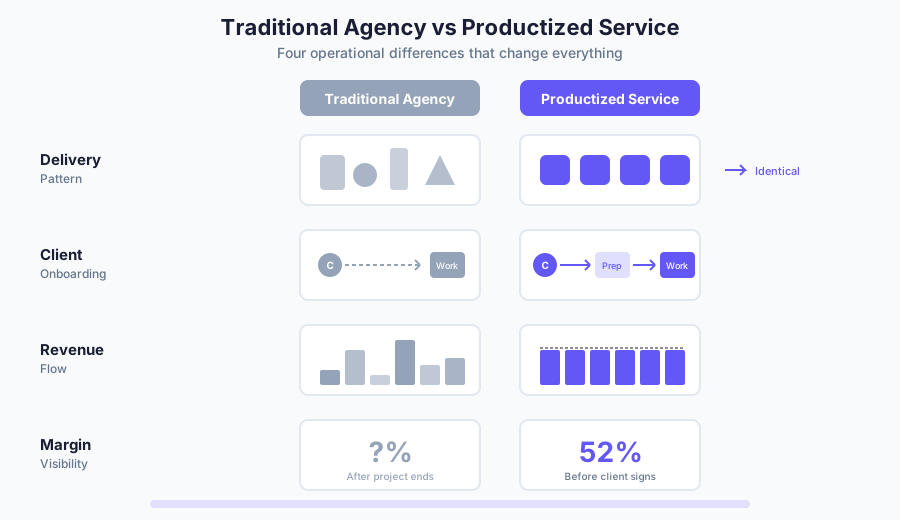
Four things matter more for productized services than traditional agencies.
Standardization across every client
Nick Saraev defines productization as delivering “the exact same experience every single time.” Not similar. Identical. The client who signs up today should go through the same onboarding, see the same portal, receive the same deliverables in the same format as the client who signed up six months ago.
For your tech stack, this means every tool needs to support templated workflows. If your project management app requires you to manually set up each new client from scratch, it’s working against the model. If your CRM can’t automate the same welcome sequence for everyone, you’re creating work that shouldn’t exist.
The question to ask: can I onboard a new client without touching this tool manually?
Client prep infrastructure
Brad Martineau’s team at Sixth Division sends new clients through three hours of training videos before any work begins. Sounds excessive until you hear his reasoning:
Your biggest challenge is you don’t know how to think about the problem. I’m going to give you a better way to think about the problem… so that when we get on a call and start to talk about your business, we are light years ahead of every other person that you would normally talk with.
 Brad Martineau,
SixthDivision
Brad Martineau,
SixthDivision
That prep work compresses delivery time dramatically. His team went from two full days to get a client live down to two hours—because clients showed up already understanding the terminology, the process, and what they needed to provide.
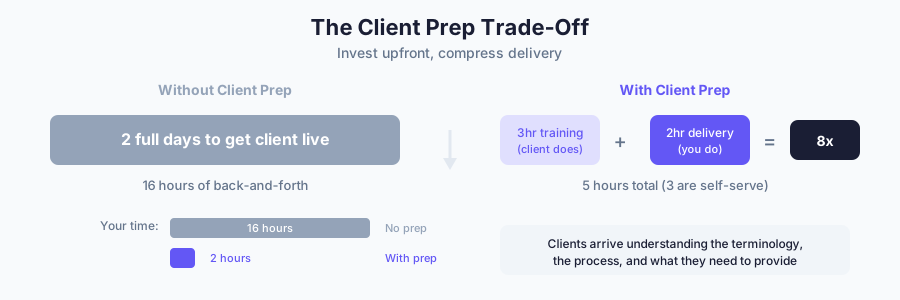
Your tech stack needs to support this. That means a place to host training content, a way to track who’s completed what, and ideally automation that gates the next step until prep is done. Most agencies don’t think about this layer at all. They jump straight to project management and wonder why kickoff calls take three hours to cover basics.
Recurring revenue architecture
There’s a distinction most people miss. Brad Martineau is blunt about it: “Recurring revenue is not the same as a payment plan. Which is not the same as a retainer. Three completely different concepts.”
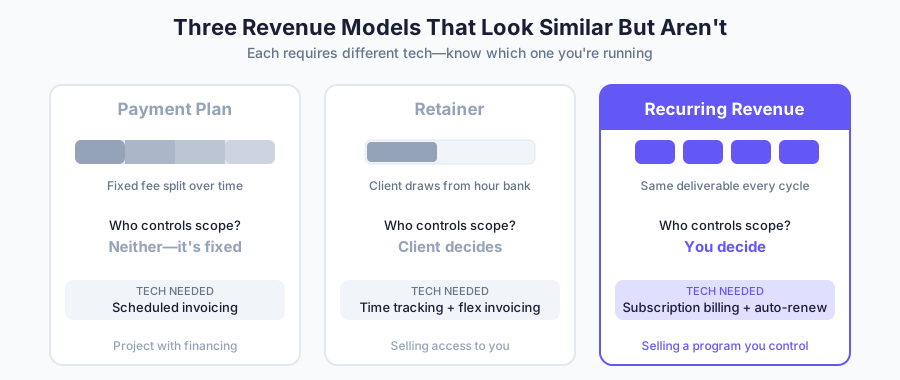
A payment plan splits a fixed project fee across months. A retainer means the client controls your time—they’re buying access to you. Recurring revenue means the client subscribes to a program you control. You set the terms, the cadence, the scope.
The difference matters for your tech stack. Retainer-based businesses need time tracking and flexible invoicing. Recurring revenue businesses need subscription billing, automated renewals, and scope limits defined in your Terms of Service.
If your billing setup requires manual invoices each month, you’re running a retainer that looks like recurring revenue. The tech should handle billing automatically so you can focus on delivery, not collections.
Fixed cost visibility
Traditional agencies find out their profit margin after a project ends. Sometimes it’s good, sometimes the scope crept and they barely broke even. The math happens in hindsight.
Productized services flip this. Nick Saraev frames it as the core advantage:
Productization lets you reverse engineer and figure out what your cost of goods sold are going to be every single time with basically zero risk of any scope creep, zero risk of any project bloat.
Nick Saraev,
One Second Copy
If you know client delivery takes exactly 12 hours of work across three team members at specific rates, you know your margin before the client signs up. That predictability only works if your tech stack gives you visibility into where time and resources actually go.
This doesn’t mean tracking every minute. It means understanding capacity. How many clients can one team member handle? At what point do you need to hire? Our capacity calculator answers both questions in under two minutes. Nick’s version: “If I know that my staff member can take on 10 clients and I’m at 9 clients right now, I should probably start looking to hire when I get my 11th.”
Your project management and team capacity tools need to answer that question at a glance. If you can’t tell whether you’re at 60% or 90% capacity without digging through spreadsheets, your stack has a gap.
Three pillars of productized service operations
Every tool in your stack should support one of three functions: managing clients, delivering work, or running the business. If a tool doesn’t clearly fit one of these, you probably don’t need it.
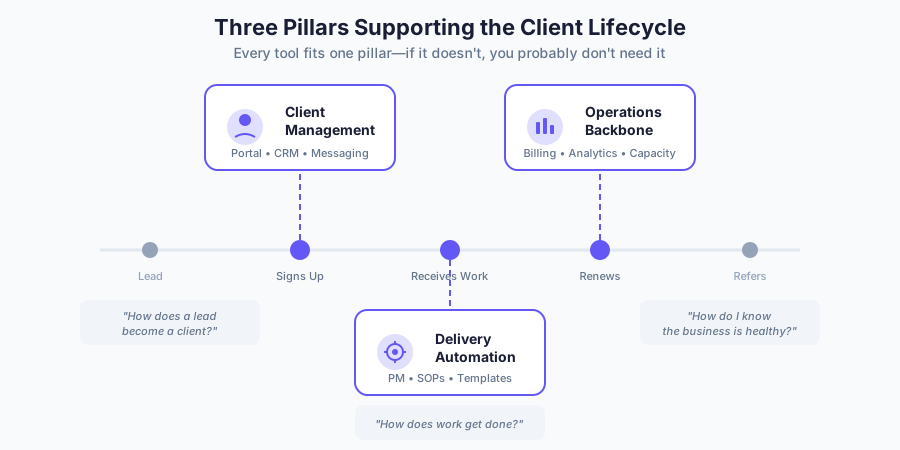
Client management
CRM, client portal, messaging, support channels—everything from first contact to ongoing communication.
How does a lead become a client, and how does that client stay informed without you manually updating them?
For productized services, the client portal matters more than the CRM. Traditional agencies obsess over CRM features because their sales process is complex—custom proposals, negotiations, follow-up sequences. Productized services have a simpler sales motion: here’s what you get, here’s what it costs, sign up when you’re ready.
What you need instead is a place where clients can see their project status, access deliverables, submit requests, and find answers without emailing you. The portal becomes the relationship hub. Your CRM just needs to track who’s active and when they signed up—which is why most productized services get more value from a dedicated client portal than an elaborate CRM.
One thing to watch: every additional communication channel is another place you have to check and another place clients might expect a response. Keep client-facing communication consolidated.
Delivery automation
Project management, task workflows, SOPs, templates, team collaboration—how work actually gets done.
How does a signed client move through your delivery system with minimal manual coordination?
Brad Martineau puts it bluntly: what feels like custom work is usually 80% identical across clients.
Custom stuff is really just 80% the exact same crap as everybody else with like 20% over the top that makes it custom.
Brad Martineau,
SixthDivision
Your delivery tools should reflect this. The 80% should be templated—project templates that auto-populate when a new client starts, task sequences that trigger automatically, SOPs that live where the work happens. The 20% is where your team applies judgment and expertise.
If your project management setup requires someone to manually create tasks for each new client, you’re rebuilding the 80% every time. The tool can handle this. The question is whether you’ve built the templates or you’re still treating every client like a custom project.
Operations backbone
Billing, analytics, financial reporting, capacity planning—the business itself.
How do you know whether the business is healthy without digging through multiple dashboards?
For productized services, the key metric is capacity. You need to know how many clients you can serve at your current team size, how close you are to that limit, and when you need to hire. Everything else—revenue, churn, margins—flows from that.
Your billing tool should handle subscriptions automatically; your analytics should show active clients, revenue per client, and team utilization in one view. If you’re exporting data to spreadsheets to answer basic questions about business health, you’re either using the wrong tools or not using your current tools fully.
Don’t over-engineer this. You don’t need a business intelligence platform to run a productized service. You need to know three things: how much money came in this month, how many clients you’re serving, and whether your team has capacity for more. A simple dashboard beats a sophisticated one that nobody checks.
What this looks like in practice
Stacks vary by service type—a design studio needs different tools than a lead gen agency.
Thibault Garcia runs Reachly, a productized lead generation agency serving 50+ clients across six countries with a seven-person team. His entire stack is four platforms: SPP for client portal and payments, Notion for project management and knowledge base, plus Clay and Lemlist to power his outbound campaigns.
That’s it. No CRM. No sprawling automation platform. No project management suite with fifty features. As Thibault puts it: “No bloat, no redundant tools. Just what’s needed to run hyper-personalized campaigns across six countries without the team drowning in manual work.”
The pattern holds across other agencies we’ve talked to: start with process, add only what you need.
How to choose tools for each pillar
Once you know what process a tool needs to support, evaluation comes down to three criteria.
Integration first
Dan Leeman runs Automation Helpers, a seven-figure agency with 25 consultants. His first question when evaluating any tool: does it connect to everything else?
If a given tool doesn’t have an API or a way of connecting into your tech stack, that means you’re creating new pockets, new silos within your organization, which means you’re creating new operational inefficiencies for the people working in the business.
 Dan Leeman,
Automation Helpers
Dan Leeman,
Automation Helpers
Native integrations are best—the tool talks directly to your other tools without middleware. Zapier or Make connections work as a fallback. No integration path at all is a dealbreaker, regardless of how good the tool is at its core function.
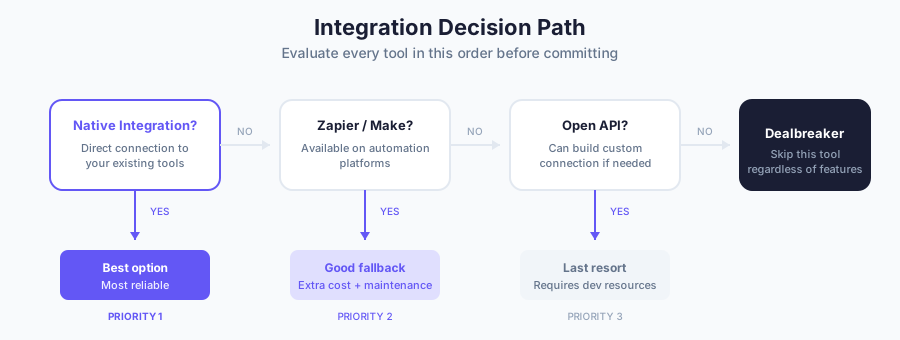
A great standalone tool that doesn’t connect to anything creates more work than it saves. Your team becomes the integration layer, manually moving data between systems—exactly the overhead productization should eliminate.
The Lego blocks criterion
Dan’s second principle: treat your stack like Lego blocks, not a foundation.
“We try to look at software like Lego blocks. How can we inject one block, something that if it doesn’t suit our purposes later, we can remove that without radically changing everything that happens in our business.”
Tools change pricing, get acquired, or stop developing features you depend on. If your entire operation is built around one platform, you’re exposed.
The test: could you swap this tool for a competitor in a month without rebuilding your whole workflow? If not, you’re not using Lego blocks—you’re pouring concrete.
Scaling headroom
The tool that works for five clients might collapse at fifty. Before committing, ask:
Does pricing scale linearly with clients, or do costs jump at certain tiers?
Are there user or storage limits that will force an upgrade?
Can your team actually use this tool, or will it require specialized knowledge?
That last one matters most. A powerful tool that only one person understands is a liability. When that person is sick, on vacation, or leaves, the whole system stalls.
One platform vs best-of-breed
Should you use an all-in-one platform that handles CRM, project management, billing, and client portals? Or pick the best tool for each function and connect them?
Dan Leeman has worked with hundreds of small businesses on this exact question:
Many software vendors are going to try to convince you that their all-in-one platform is exactly what your business needs. However, in my experience of working with hundreds of small and medium businesses, as well as growing my own seven-figure agency, I rarely find that’s exactly the case.
Dan Leeman,
Automation Helpers
But he’s equally skeptical of the opposite extreme—businesses that try to use one tool for everything it wasn’t designed to do:
“I know a lot of businesses that try to use Notion for absolutely everything—they use it for processes, their CRM, project management, client communication, their calendar. What would happen if Notion suddenly decided they wanted to double their prices across the board? That can leave your business in a lurch if you’re absolutely dependent on one tool.”
So where does that leave you? Both extremes create risk.
When all-in-one makes sense
Consolidation works when you’re early stage and need to move fast. One platform means one login, one bill, one support team to contact when something breaks. The overhead of connecting multiple tools can slow you down when you should be focused on delivery.
It works just as well when the platform genuinely handles multiple pillars well. Some tools started as project management and expanded into CRM and billing. If the expanded features are solid—not just checkboxes on a feature list—consolidation reduces complexity.
When best-of-breed wins
Specialized tools win when you have specific requirements that all-in-one platforms handle poorly. If your billing needs are complex—usage-based pricing, multiple subscription tiers, prorated charges—you probably need a dedicated billing tool. If your client portal needs custom branding and workflows, look for one that is easily extendable and has its own API.
Best-of-breed wins at scale too. The tool that handled everything at $20K monthly revenue might show cracks at $100K. Teams get bigger, processes get more specific, and the limitations of “good enough” features become daily friction.
The good enough threshold
Skip the all-in-one vs best-of-breed debate. The better question: does each tool in your stack clear the bar for its function?
Good enough means the tool does what you need without creating extra work. Not perfect, not best-in-class—just invisible. It disappears into the workflow instead of demanding attention.
If your all-in-one platform’s project management is good enough and its billing is good enough and its portal is good enough, stay consolidated. If one of those is creating friction—manual workarounds, client complaints, team frustration—that’s the piece to replace with something specialized.
Don’t optimize for theoretical perfection. Optimize for a stack that runs without you constantly adjusting it. If you’re weighing consolidation options, our comparison of SPP, Productive, Scoro, and SuiteDash breaks down where each platform excels.
Building your stack in phases
The worst way to build a tech stack is all at once. You end up with tools solving problems you don’t have yet while the actual bottlenecks go unaddressed.
Jeet Banerjee, who built his agency Vintelli to $275K in annual revenue, learned this the hard way: “I think a lot of people try to automate everything and if you do that, it can be catastrophic. Focus on the one biggest problem that’s bugging you the most. Solve that problem and automate that and then kind of take small steps.”
That phased approach matches how productized services actually grow.
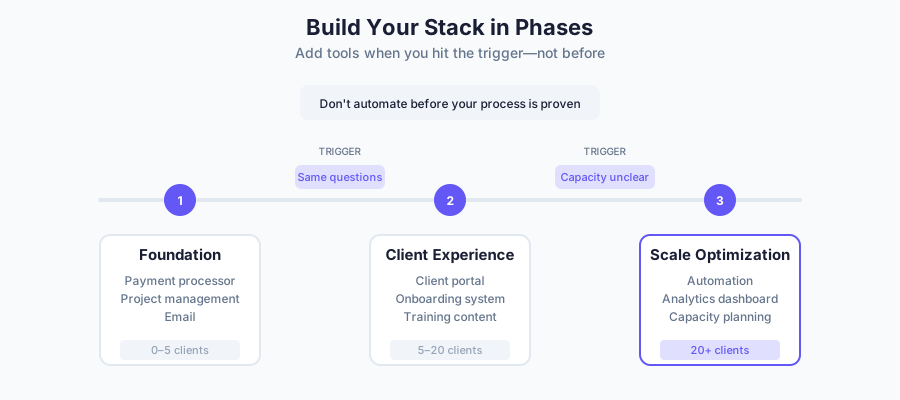
Phase 1: Foundation
Before you have clients, you need three things: a way to accept payments, a way to deliver work, and a way to communicate.
Evripides Gavriel, whose automation frameworks have helped agencies save over $11 million, breaks it down:
At the bare minimum, you need a payment processor like Stripe, Google Workspace, and a project management tool. You don’t need a CRM for sales—you can build that in any project management tool.
 Evripides Gavriel,
FlowFix
Evripides Gavriel,
FlowFix
That’s it. A payment processor, a PM tool like ClickUp, Asana, or Monday, and email. Everything else can wait until you’ve validated that people will pay for what you’re offering.
The temptation is to build infrastructure for scale you haven’t reached. Resist it. You don’t need a client portal when you have three clients. You don’t need automation when you’re still figuring out your delivery process. Get the basics working manually first.
Phase 2: Client experience
Once you’re consistently delivering and have more than a handful of clients, the cracks show up in client communication. You’re answering the same questions repeatedly. Clients don’t know where to find things. Status updates take too long.
The client portal earns its place here—not before. A portal with three clients is overhead. A portal with fifteen clients is sanity.
Onboarding gets formalized in this phase too. Brad Martineau’s training videos didn’t exist on day one—they came from recognizing the same prep conversations were happening with every client. Build the infrastructure after you know what it needs to contain.
Phase 3: Scale optimization
Past twenty or thirty clients, efficiency becomes the constraint. Your delivery process works, but it takes more time than it should. Your team is busy, but you can’t tell if they’re at capacity or just disorganized.
Automation and analytics pay off at this stage. Connect your tools so data flows without manual entry. Build dashboards that show capacity at a glance. Automate the repetitive parts of onboarding and delivery.
The sequence matters. Automation without a solid process just makes broken things happen faster. Analytics without clear workflows give you data you can’t act on. Fix the process first, then optimize it.
Common tech stack mistakes
The same three mistakes come up in almost every productized service struggling with their stack.
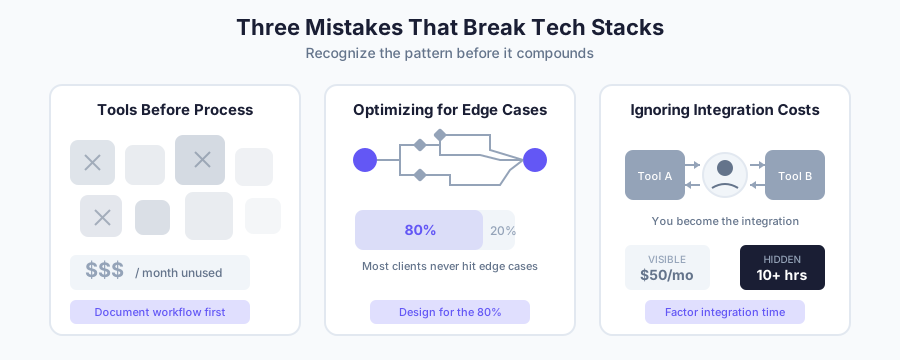
Adding tools before processes
Buying software to solve a problem you haven’t defined creates new problems.
The symptom is a graveyard of unused subscriptions—tools that seemed promising during a demo but never got adopted, integrations that were set up once and broke months ago without anyone noticing.
Evripides Gavriel sees this constantly in his agency audits: “They’ve been adding, adding, adding, adding—and it became total chaos with Google Sheets and ClickUp and everything. I told them we need to throw away 90% of what you have and rethink your system.”
The fix: before evaluating any tool, write down the process it needs to support. Not features you want—the actual steps that happen today, manually. If you can’t describe the workflow, you’re not ready for software to automate it.
Optimizing for edge cases
Your tech stack should handle the typical client, not the unusual one. When you build around exceptions, you create complexity everyone has to navigate even though most clients never need it.
The symptom is a system full of conditional logic, custom fields nobody uses, and workarounds for situations that happened once. The setup takes longer to explain than to use.
The fix: design for the 80%. When an edge case comes up, handle it manually. If the same edge case keeps coming up, it’s not an edge case anymore—update the system. But don’t preemptively build for scenarios that might never happen.
Ignoring integration costs
The sticker price of a tool is not the real cost. The real cost includes the time to set it up, the time to maintain integrations, and the ongoing friction of working around limitations.
A $50/month tool that doesn’t integrate with anything costs more than a $150/month tool that connects natively to your stack. The hours your team spends manually moving data between systems add up faster than subscription fees.
The symptom is a team that complains about busywork—copying information between tools, exporting and reimporting data, double-checking that systems are in sync.
The fix: factor integration time into every tool decision. If connecting a new tool requires custom development or constant maintenance, the tool needs to be dramatically better to justify the overhead.
Frequently asked questions
How many tools should a productized service have?
Five to eight core tools covering client management, delivery, and operations. The better question: does each tool support a defined process without creating manual work?
When should I consolidate tools vs. use specialized ones?
Consolidate when you’re early stage or when an all-in-one handles multiple functions well enough. Use specialized tools when you have specific requirements or when good enough features create daily friction.
What’s the minimum tech stack needed to start a productized service?
Three things: a way to accept payments, a way to deliver work, and a way to communicate. Typically Stripe, a project management tool, and email. Everything else can wait until you have enough clients.
How do I know if a tool will integrate with my existing stack?
Check native integrations with your current tools, availability on Zapier or Make, and whether the tool has an open API. No integration path at all is a dealbreaker.
Should I build my tech stack before or after documenting my processes?
After. Document how you deliver your service manually first—the steps, the handoffs, the client touchpoints. Then find tools that make those steps faster.
Do I need a CRM for a productized service?
Not in the traditional sense. Productized services have simpler sales—fixed offerings at fixed prices. A client portal matters more. Your CRM only needs to track who’s active and when they signed up.
How much should I budget for my tech stack?
$200 to $800 per month for core tools. But subscriptions are the smaller cost—the real expense is time spent managing disconnected tools.
What’s the most important integration for a productized service?
The connection between your client portal and project management tool. When a client submits a request, it should flow automatically into your delivery system without manual entry.
How do I avoid tool sprawl as my business grows?
Before adding any tool, ask: what process does this support, and can an existing tool handle it? Audit your stack quarterly and cancel anything unused for 90 days.
Making your stack work for you
The productized service owners with the cleanest operations figured out their process first and picked tools that stay out of the way.
Next time someone in a Slack community swears a tool will fix your operations, ask yourself: what process would this support? If you can’t answer that clearly, you’re not ready for the tool. You’re ready to document the workflow.
Your tech stack should feel boring. Not exciting, not cutting-edge, not impressive to explain. Just boring and functional. When clients get consistent results and your team isn’t fighting their tools, you’ve got it right.