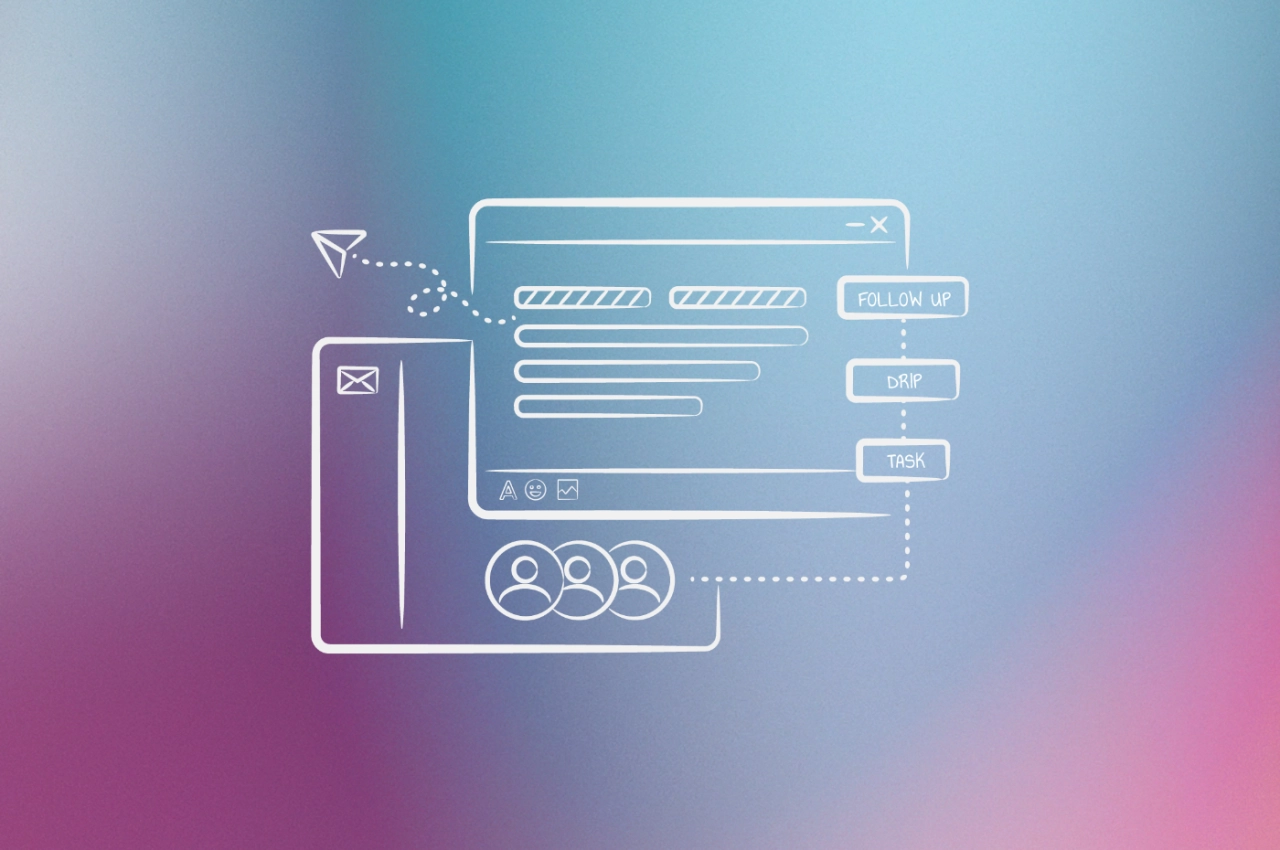
- Segment by relationship, not just demographics: prospects, active clients, past clients, and referral partners each need different emails at different frequencies.
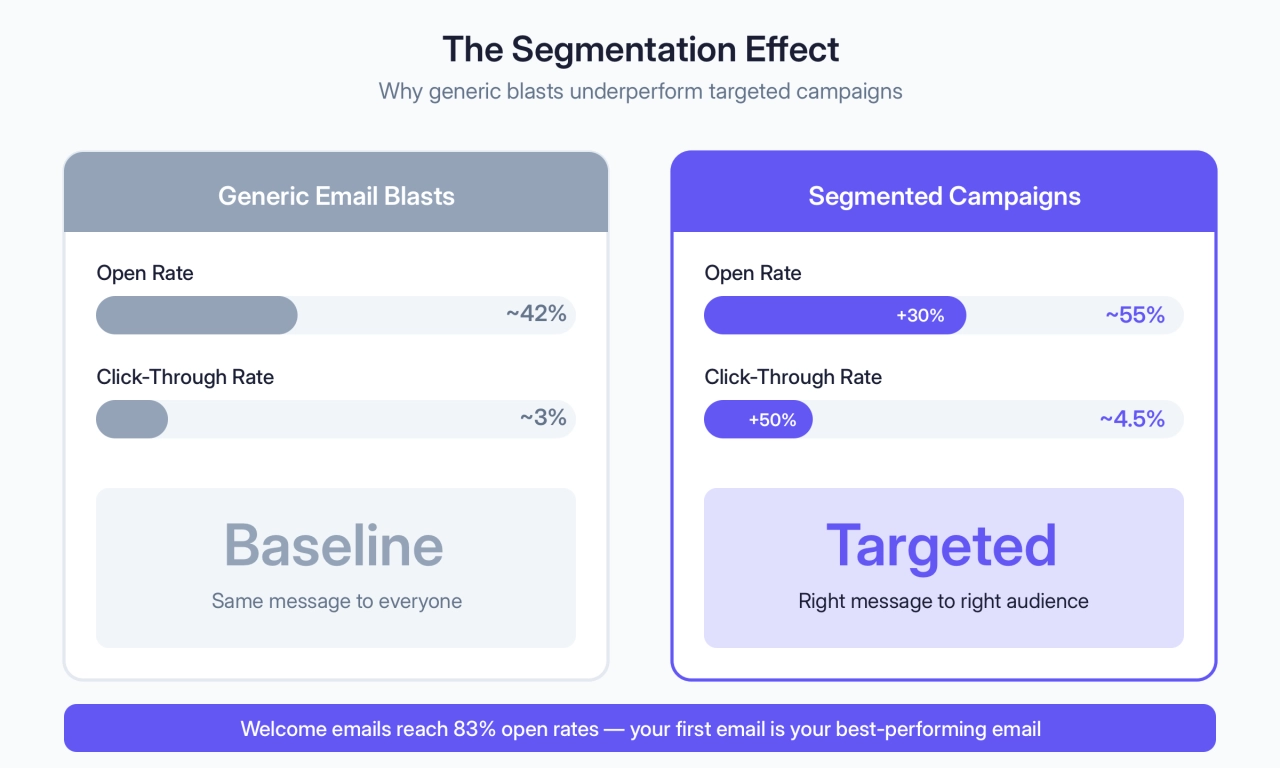
- Welcome emails average 83% open rates. Segmented campaigns see 30% more opens and 50% more clicks than generic blasts. Start there.
- A simple nurture sequence, Day 0 welcome, Day 2 objections, Day 6 offer, beats complex automations for most agencies.
You’ve probably got an email list you’re not doing much with. Maybe a few hundred subscribers, maybe a few thousand. They signed up for something at some point, and now they just… sit there.
Meanwhile, you’re chasing leads on LinkedIn, running ads, hoping referrals come through. All while ignoring the people who already raised their hand.
Email isn’t sexy. It’s not the new thing. But it’s the one channel where you’re not renting attention from an algorithm. This guide covers how to actually use it: segmentation, sequences, automation. With examples from agencies that turned neglected lists into real pipeline.
Understanding this topic involves several interconnected concepts:
- Lead Generation
- Churn Rate
- Client Onboarding
- CRM (Customer Relationship Management)
- Client Segmentation
- Workflow Automation
- Scope Creep
- Client Lifetime Value (CLV)
Each of these concepts plays a crucial role in the overall topic.
What good looks like: B2B email benchmarks
Before diving into tactics, you need to know what you’re aiming for.
Metric | Average | Good | Excellent |
|---|---|---|---|
Open rate | 39-42% | 45%+ | 50%+ |
Click-through rate (CTR) | 2-3% | 4%+ | 5%+ |
Click-to-open rate (CTOR) | 5-6% | 8%+ | 10%+ |
Unsubscribe rate | 0.1-0.5% | Under 0.3% | Under 0.1% |
Bounce rate | Under 2% | Under 1% | Under 0.5% |
Sources: GetResponse Email Marketing Benchmarks 2024, MailerLite 2025 Benchmarks, HubSpot 2025 Email Statistics
A few caveats:
Open rates are inflated: Apple’s Mail Privacy Protection auto-opens emails, skewing the numbers. CTR is now the more reliable engagement metric. It shows who actually did something.
Welcome emails outperform everything: The average welcome email sees an 83% open rate. If you’re not sending one, you’re leaving easy engagement on the table.
Segmented campaigns crush generic blasts: Segmented emails see 30% higher open rates and 50% more clicks than unsegmented ones. That’s not marginal. It’s the difference between a campaign that works and one that doesn’t.
Choosing the right email marketing software
Before diving into the framework, you’ll need an email marketing platform. The essentials: segmentation capabilities, automation workflows, A/B testing, and reliable deliverability.
I’ve seen agencies have success with ActiveCampaign and MailChimp. Both integrate seamlessly with SPP.co. But the right choice depends on your agency’s size, budget, and automation needs.
For a detailed breakdown of email marketing platforms, features, and pricing, check out our comprehensive guide: Marketing Automation for Agencies.
The complete agency email marketing framework
No matter which email marketing tool you may choose, there are certain best practices you should follow to ensure success. Here’s a comprehensive framework that combines strategic planning with tactical execution.
Step 1: set clear goals and objectives
You can’t measure success if you don’t have goals. Start by defining your email marketing goals, then break them down into smaller, achievable objectives.
Your goals for email marketing campaigns could include:
increasing website visits
building your email list
increasing conversions
improving engagement
educating your potential customers
upselling existing clients
reinforcing your agency’s brand positioning
Step 2: build and segment your email list
Your email list is your pipeline. A big list of unengaged subscribers is worth less than a small list of people who actually open your emails. This step covers how to build a quality list and segment it so every email you send feels relevant.
Building your list
With your goals set, it’s time to get people to sign up for your email list. The best way to do that is with an opt-in form, which you can embed in blog posts or landing pages. Ensure that you’re not tricking people into signing up, but promise them value-based emails delivered at certain intervals to their inbox.
Email list building is a critical component of your broader client acquisition strategy: the more qualified subscribers you have, the stronger your pipeline becomes.
Building a list of subscribers who are not interested in your content will lead to low open rates that are not beneficial. Instead, you want highly engaged subscribers that make lead nurturing easy.
We’ve developed a dual-track approach to list building. While we run targeted acquisition campaigns, we simultaneously monitor engagement patterns of new subscribers. Recently, when launching a client’s industry newsletter, we initially captured 2,000 new subscribers through downloadable guides, but focused on the 40% who consistently opened and clicked—they became our benchmark for future targeting.
 Aaron Whittaker,
Thrive Digital Marketing Agency
Aaron Whittaker,
Thrive Digital Marketing Agency
In order to maintain a valuable email list, send a welcome email that introduces them to your services, but also tells them what to expect next.
Your email list is never big enough. People subscribe relatively easily (particularly if there’s an incentive involved). Engaging them is an entirely different animal. For inbound, focus on lead magnets and content upgrades. For outbound, you can accelerate growing your email list with B2B contact sourcing tools.
Segmenting your audience
Generic advice says “segment by demographics and interests.” Here’s what that looks like for a real agency:
A web design agency might segment into:
Prospects: Downloaded a lead magnet but haven’t booked a call
Active clients: Currently in a project
Past clients: Project completed, potential for maintenance/retainer upsell
Referral partners: Other agencies, freelancers, or vendors who send leads
Each segment gets different emails:
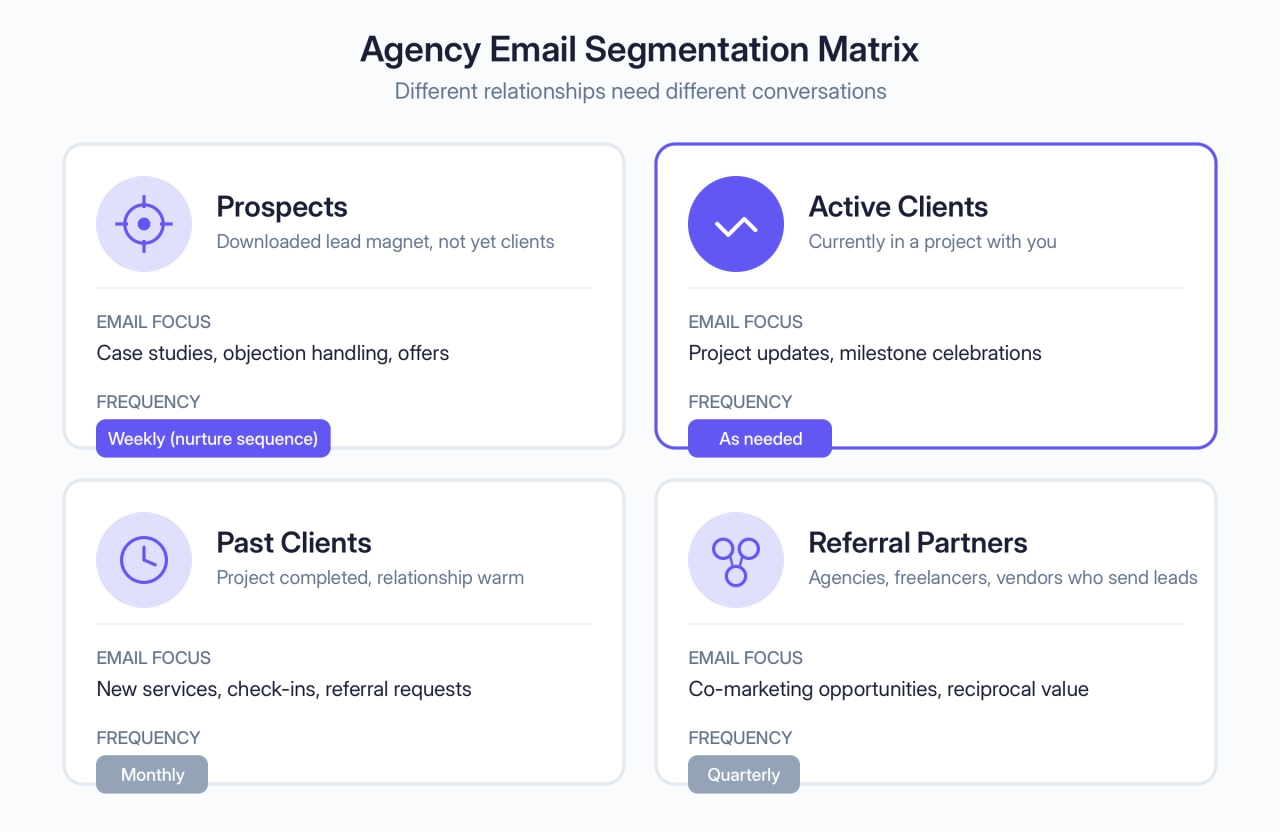
A marketing agency might add:
By service interest: SEO leads vs. PPC leads vs. social media leads
By company size: Solopreneurs vs. funded startups vs. established businesses
By engagement level: Opened last 3 emails vs. gone cold
The point: don’t email everyone the same thing. A past client doesn’t need your “why choose us” sequence. A cold prospect doesn’t need your referral partner newsletter.
Even with one buyer persona, people sit at different points in the buying cycle, from marketing qualified leads to sales-ready prospects. Batching them together means speaking in terms too general to hold attention. Segmenting them means every email feels relevant.
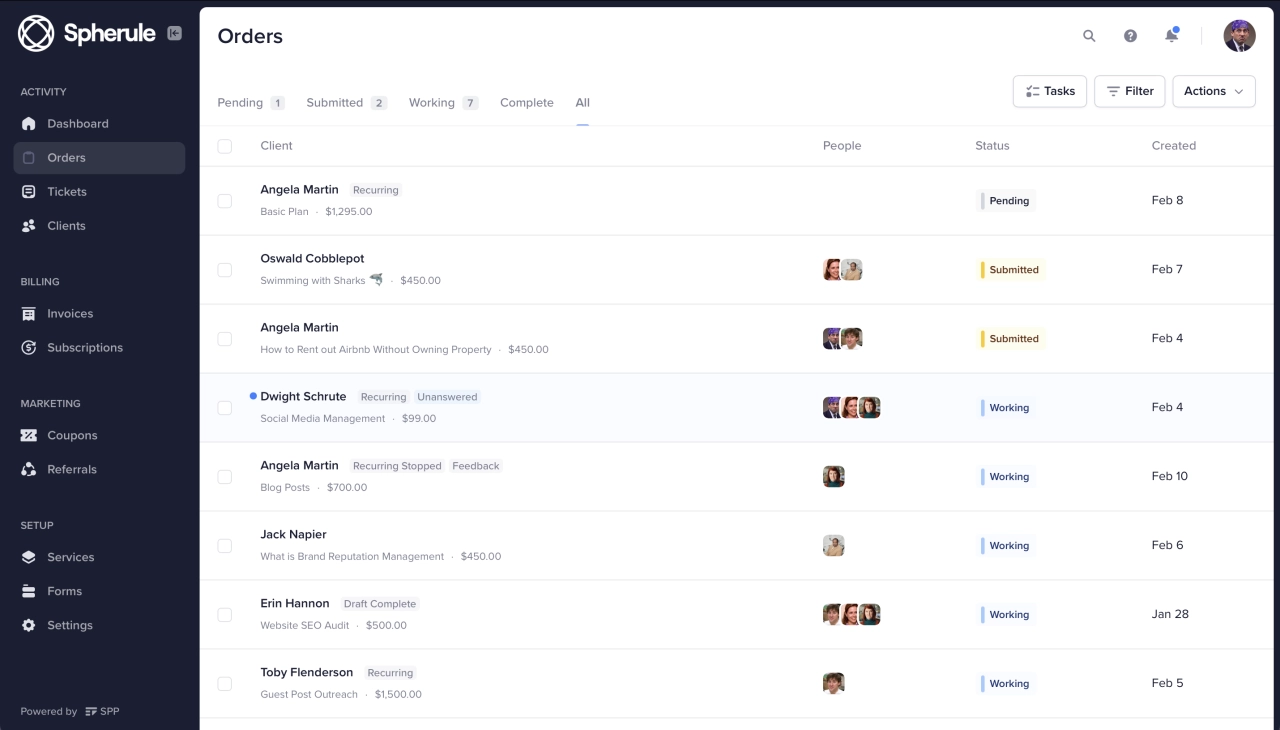
If you use SPP, you can segment based on purchases made. Integrate your email tool via ActiveCampaign, MailChimp, or Zapier to pull that data automatically.
Step 3: create your email campaign structure
You’ve got goals and a segmented list. Now you need to decide what emails to send and when. This step covers mapping your emails to the buyer’s journey, building a day-by-day sequence, and setting up automation so it runs without you.
Consider the buyer’s journey
With your goals established and list segmented, consider the buyer’s journey funnel. How do your leads become clients? Identify the different stages your leads go through and determine where you can incorporate email marketing.
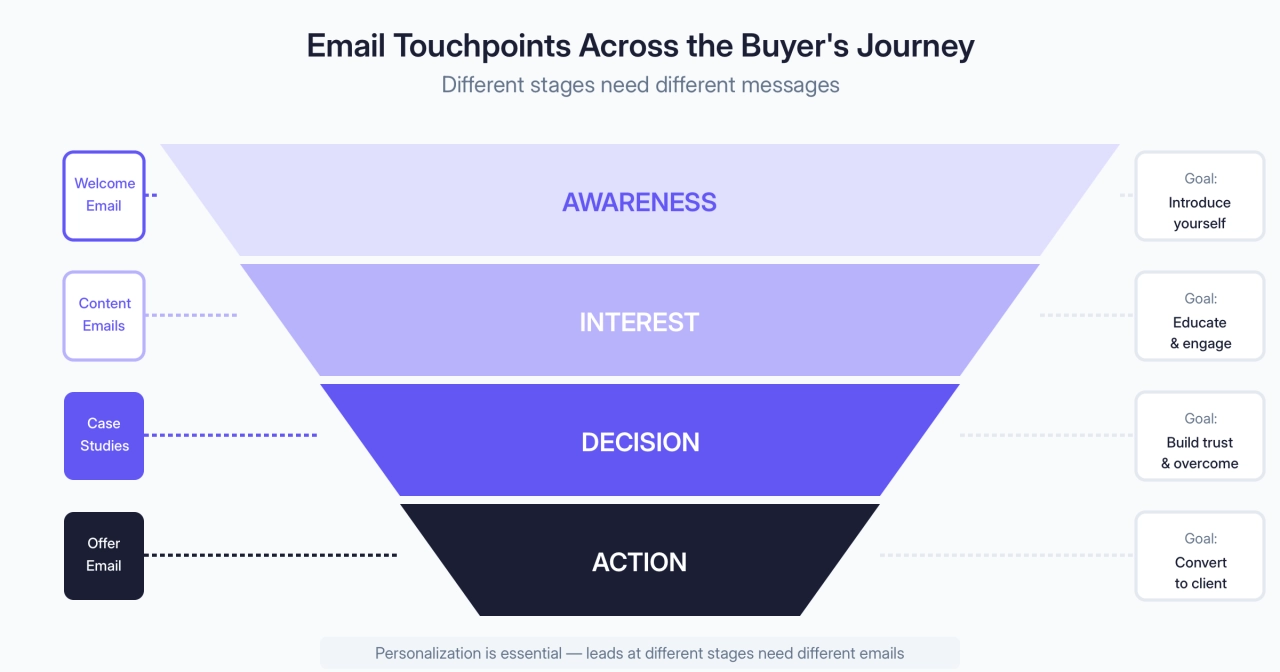
For example, if you aim to increase sales during Christmas, create a funnel that generates interest before the holiday season. Be sure to mention upcoming discounts, additional services, or other incentives based on the buyer journey stages.
Remember, personalization is essential in the buyer’s journey. Your leads or clients expect personalized emails that build a strong relationship or lay the groundwork for one.
The day-by-day email sequence
You should send just the right number of emails to provide value, while not annoying your potential future clients, which is why it’s important to segment subscribers. To segment them, you could create different signup forms for your landing pages and add them to a list based on where they signed up from.
Here’s a proven sales funnel you can implement for prospective customers who’ve just filled out an opt-in form on your website:
Day 0: Thanks for signing up, here are your details, click here to check out our services. This email is automatically sent from SPP.co, and can be adjusted to suit your preferences.
Day 1: Why they should choose you, what’s your story, what makes your agency awesome. Describe the process of how your service works.
Day 2: Time to address objections. A good place to start is “Are you going to deliver what you say you will?”. To address this and other objections you can include social proof, testimonials, and case studies. We’ve emailed three days in a row at this point.
Day 4: Helpful content. Tell them what to look for when outsourcing the service you provide. This is genuinely useful even if they don’t end up buying. Make sure your agency fits that criteria, it would be weird if it didn’t.
Day 6: Send a coupon or a special offer of some kind. For certain buyers, that’s enough to push them over the edge.
Days 8+: More tips and advice, whether they’re your best blog articles or unique content for that email. As we get farther from the signup date you can ease up on your email frequency.
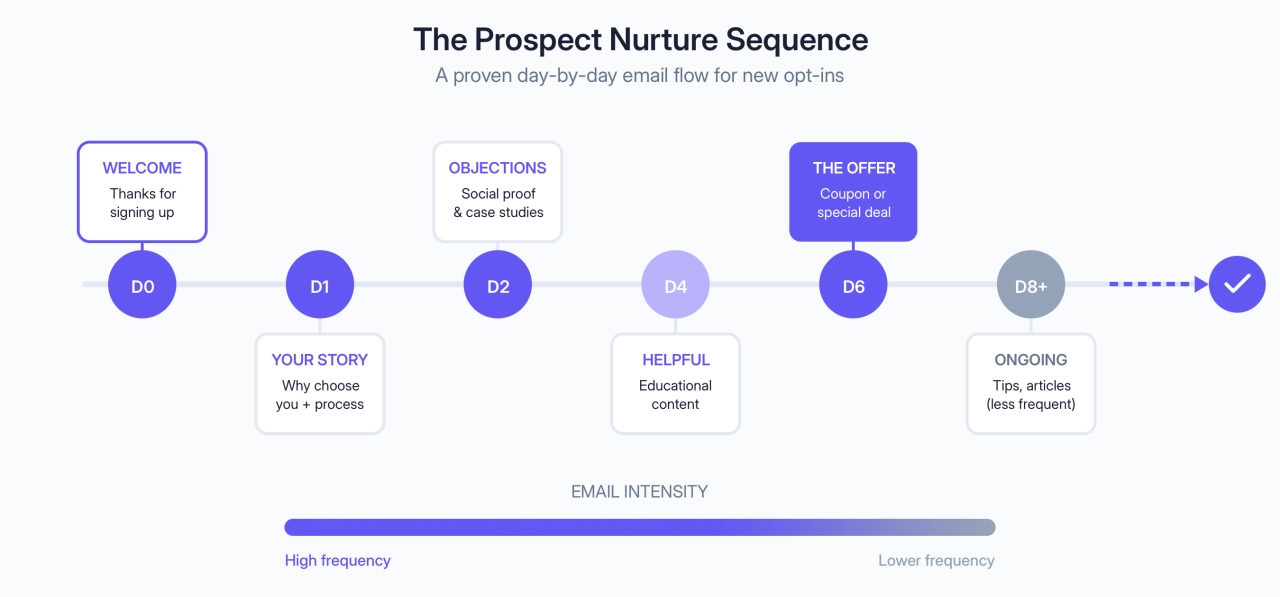
This is a straightforward time-based sequence and we don’t take into account any user behaviors for simplicity’s sake. If they do convert at any point, they should be removed from the sequence.
Email automation and workflows
One of the main benefits of email marketing is automation. When done correctly, you can use automation to create personalized campaigns triggered when someone takes a specific action (like subscribing to your list or buying a service).
Two key components of email automation are autoresponders and workflow automation. Autoresponders automatically send pre-written emails based on specific triggers, such as a new subscription or inquiry, ensuring timely responses without manual effort.
However, workflow automation extends beyond basic autoresponders, offering more sophisticated and personalized email sequences. Workflows can be tailored to guide clients through various stages of their journey, from onboarding to project completion. For instance, an agency might set up a workflow to send a series of welcome emails introducing their services, followed by periodic updates on industry trends, and finally, requests for feedback or reviews.
Implementing email automation workflows allows agencies to maintain consistent communication, nurture leads, and build stronger client relationships. By automating these processes, agencies can focus on strategic tasks while ensuring that every client receives personalized, timely, and relevant information.
Step 4: design and write compelling emails
Structure matters, but so does execution. A perfectly timed email that looks like spam or reads like a brochure won’t convert. This step covers design choices that improve deliverability and writing techniques that make your emails feel like real conversations.
Email design best practices
Just like in fashion, less is more in email design too. A simpler email design makes it all feel more conversational, removes distractions from your readers, and makes it easier for them to recognize the message. What’s more, simpler email design can help you move past the spam filters, thus improving your email deliverability.
Technical setup matters too. Implementing DMARC protocols helps your emails land in inboxes instead of spam folders and protects your domain from phishing spoofs.
The reason this happens is because spammers used to send images via email, to bypass spam security checks. Modern spam detector algorithms consider an abnormal image-to-text ratio spammy. Therefore, too many images can throw your email campaigns into the recipient’s spam.
Another important thing to consider is making sure your email looks good on all devices. Complex or not, your email designs should be usable, clickable, and easy to read, regardless of whether it’s opened on a mobile phone, tablet, or desktop.
Weirdly, nicer looking emails aren’t always better, especially if we’re going to be sending educational and helpful content.
Whichever style you go with, make a template and use it for all marketing emails you send. Check out reallygoodemails.com for many examples of email copy and designs.
Writing tips and personalization
Here are some tips for writing your email content with a personal touch:
Keep your emails singularly focused: Each email in your sequence is responsible for one thing and one thing only. Whether it’s getting the reader to click a link, send a reply, address their objection, or establish your expertise. Don’t mix and match calls to action.
Use short email subject lines: Keep in mind that many subscribers read emails on their mobile device. If you send targeted emails with a long subject line, they will most likely get cut off.
Put content in the actual email: When sending content from your blog you can send it as a link, or include the gist of the piece in your email’s body, along with a link to the full post. The latter avoids an extra click and gives people some value in the email itself.
Compose in your email client: Yes, we’re sending marketing emails, but we can still do our best to make it feel like a true 1-on-1 email, even if it has an unsubscribe link at the bottom. Open up your Gmail or Apple Mail and start writing as if you’re replying to a prospect. For me, it feels more natural to write emails this way, even if I end up sending them to many people.
Write all your emails, then copy them over: This keeps you out of the settings and makes it easy to make quick changes across emails.
Step 5: create lead magnets and incentives
The average office worker receives 121 emails per day. That’s not a typo. And about 23% of work time goes to just checking messages.
These numbers may feel like an exaggeration, but the idea is we’re being bombarded with emails from every corner of the internet. People rarely want to subscribe to yet another email in their inbox, just for the sake of it.
So, to get more people into your email list (and thus, receive your emails), you should build lead magnets and offer incentives. These offers are hard to resist and help you overcome the noise in someone’s inbox.
My approach is quality first, supported by precise tactics to ensure growth and engagement. Expanding the list starts with lead magnets designed for a very specific audience. For example, instead of offering a generic eBook, I’ll create a “5-Step email automation workflow template” for marketers or a “Budget optimization tool” for small business owners. These resources are tied to actionable value, solving niche pain points.
 Peter Lewis,
Strategic Pete
Peter Lewis,
Strategic Pete
They could be anything from free content pieces (ebooks, cheat sheets) to discounts for subscribing or even an invitation for a webinar.
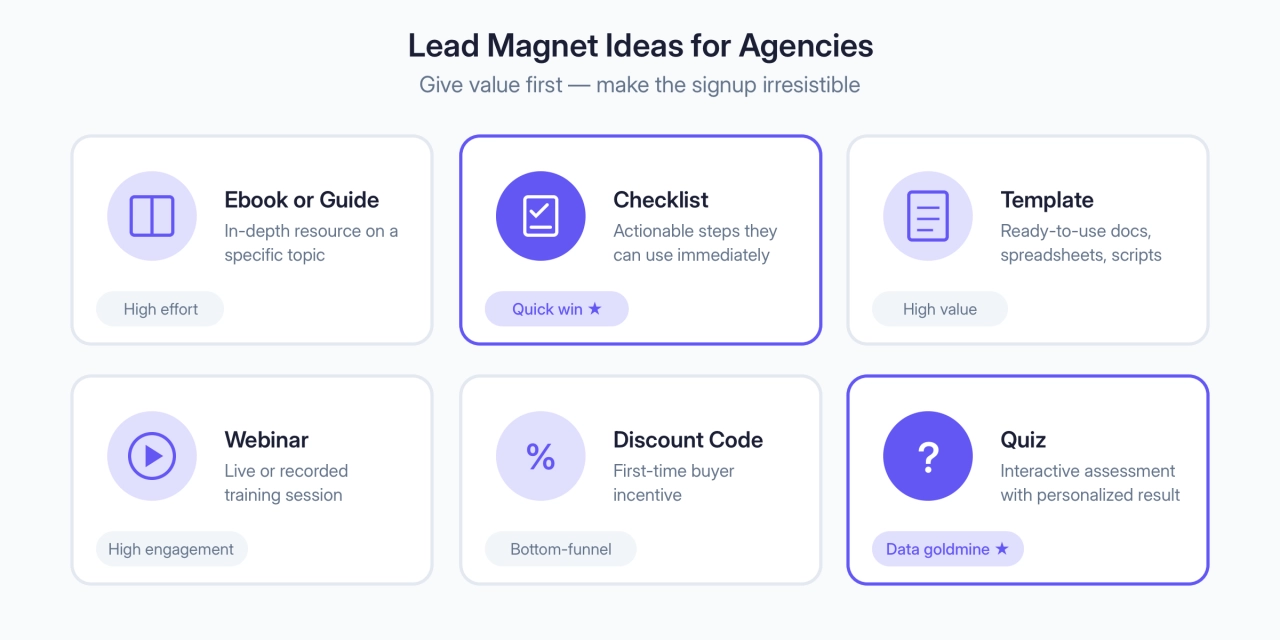
You can even use a QR code to bridge offline and online signup. Print materials, event handouts, business cards, all can drive subscribers to your list.
Step 6: track, test and optimize
Most agencies set up their email sequences and never touch them again. That’s a mistake. The difference between a 2% click rate and a 5% click rate compounds over hundreds of emails. This step covers what to test first and which metrics actually matter.
A/B testing
Start with subject lines. They have the biggest impact on whether your email gets opened at all.
What to test | Examples |
|---|---|
Length | Under 30 characters vs. 50+ |
Question vs. statement | “Struggling with scope creep?” vs. “How to stop scope creep” |
Personal vs. professional | “Quick question” vs. “3 ways to improve client retention” |
Once you’re hitting good open rates, move to:
What to test | Examples |
|---|---|
From name | Your name vs. agency name vs. “Name at Agency” |
Send time | Tuesday 10am vs. Thursday 2pm (test your actual audience, ignore generic advice) |
CTA copy | “Book a call” vs. “Let’s talk” vs. “See how it works” |
You don’t need to test everything. Find what moves the needle for your list, then standardize it.
Analytics and performance tracking
You can’t improve what you don’t measure. Track your opens, clicks, and conversions, then actually do something with that data.
Agency email marketing success stories
The strategies above work across industries. Here are three examples, from service businesses to SaaS, that show what’s possible when you nail segmentation and personalization.
Set Fire Creative: from 8 to 70 leads/month
McCain Kennedy’s agency Set Fire Creative took on a trenchless pipe repair company struggling with lead flow. The fix wasn’t complicated: segment the email list by customer interactions and purchase history, then send targeted follow-ups instead of generic blasts.
The results speak for themselves. Monthly leads jumped from 8 to over 70. The company scaled from under $1 million to $10 million in revenue within two years. Email wasn’t the only factor, but it was the engine that kept prospects warm until they were ready to buy.
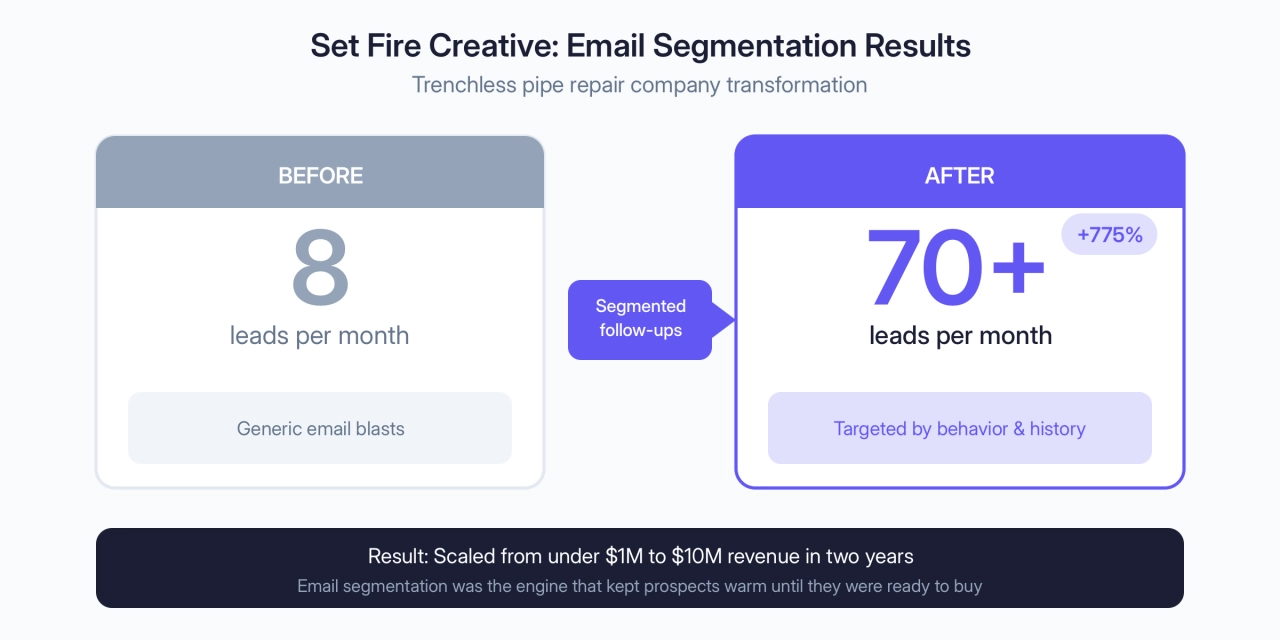
The takeaway for agencies: service businesses have longer sales cycles than e-commerce. Your email sequences need to nurture over weeks or months, not days.
Penfriend: 25% waitlist conversion via newsletter
Tim Hanson and his co-founders at Penfriend skipped the typical SaaS playbook of burning cash on ads. Instead, they leveraged their combined 100k+ LinkedIn following and treated their product waitlist as a daily newsletter.
The content wasn’t polished marketing, it was honest, behind-the-scenes updates about building an AI product. The wins, the fails, everything in between.
Launch day results: 25% conversion rate on the waitlist (vs. the typical 2-3% for SaaS), generating $40k in sales.
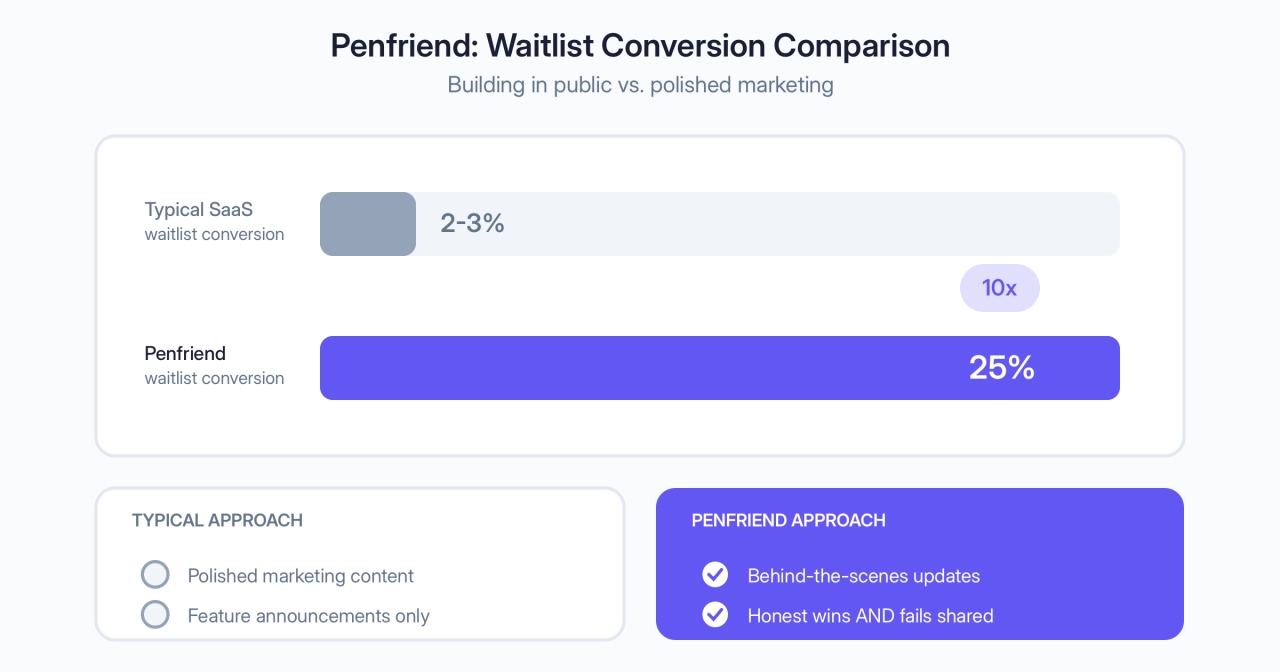
The lesson here: if you’re marketing your own agency, your email list doesn’t need to be huge. It needs to be engaged. Building in public, sharing real progress, not just wins, creates the kind of trust that converts.
Wild: zero-party data personalization
Wild partnered with Magnet Monster to overhaul their Klaviyo email automation using zero-party data, information customers voluntarily share about their preferences.
Magnet Monster implemented a personalized welcome flow that asked new leads about their interests upfront, then tailored the entire sequence based on those answers. They also built a subscription education flow to reduce buyer’s remorse and address churn before it happened.
The result: higher conversions at the top of funnel and better retention downstream.
For agencies, the principle applies directly: ask prospects what they need during signup, then use that data to personalize every email that follows. Generic sequences feel like spam. Personalized ones feel like service.
Advanced tactics for long-term success
The framework above gets you from zero to a working email system. But email compounds over time. These tactics help you keep the momentum going after the initial sequences end.
Nurturing leads long-term
One of the best ways to use email marketing for your agency is by lead nurturing. Lead nurturing is the process of building a relationship with your potential customers even before they purchase from you. Done well, this builds the kind of trust that turns into referrals. Word-of-mouth is hard to manufacture, but a good nurture sequence plants the seeds.
To be successful, you need to provide valuable content and insights without asking for anything in return (just yet). This way, when they’re ready to buy, they’ll be more likely to turn to you rather than a competitor.
This approach aligns perfectly with inbound marketing strategies, where you attract prospects through valuable content rather than interruptive advertising.
Monthly newsletter strategy
Your follow-up sequence will only last 2, maybe 4 weeks. It doesn’t have to be dead air after that.
Sending a monthly newsletter is a great way to keep in touch with your prospects and clients after the initial emails.
Talk about any new services you’ve added, process changes, new team members, featured clients, seasonal sales. It could even be a collection of relevant links for that month.
As you begin to get some data from your reports you can start adapting your emails, testing different variations, or implementing more advanced conditions.
Scaling your email marketing
What works at 1,000 subscribers breaks at 10,000. And what works at 10,000 can tank your deliverability at 100,000.
At smaller list sizes, you can get away with manual, personal outreach. As you grow, segmentation becomes essential. At scale, deliverability and list hygiene matter more than clever copy.
Don’t copy big-list strategies too early. At 1,000, focus on connection. At 10,000, focus on segmentation. At 100,000, treat deliverability as seriously as content.
 Suraj Shrivastava,
SERP Forge
Suraj Shrivastava,
SERP Forge
The biggest mistake? Chasing list size over list quality.

Clean your list every 60 to 90 days. Remove subscribers who haven’t opened in 6 months. A 20,000-person list of engaged readers beats 100,000 people who forgot they signed up.
Implementation guide
You’ve got the strategy. Here’s how to actually set it up in SPP.co and your email tool.
Setting up your email tool
Go to your SPP.co workspace and enable the email integration of your choice. Or select Zapier if your email service isn’t natively supported.
You’ll need just two rules for this to work:
Add everyone who signs up to a list.
Tag buyers with a “client” tag.
Finally, in your email automation tool, you can begin setting up the automation.
The entry point should be all new subscribers.
The goal should be “client” tag added.
The specifics of adding your emails will vary from platform to platform. In general, make sure you use the same template, the same From header and Sender email throughout your campaign.
Why SPP.co doesn’t send marketing emails
When you send an order update to your team or a client from SPP.co, it goes out via email. These important emails, along with receipts, password resets and welcome emails are considered transactional.
In other words, they are 1-on-1 emails triggered by some action in your client portal.
The other kind is marketing email. These are your newsletters, automation sequences, product announcements and so on.
Why am I telling you all this?
Because inboxes like Gmail treat transactional emails and marketing emails differently. If we want our important stuff to get through we can’t send marketing emails from the same email server as our order updates, or we risk having high priority notifications lumped together with marketing.
For that reason, we haven’t built any mass email features into SPP.co. Since you can’t send any bulk or marketing emails from SPP, you’ll need to get a dedicated tool for the job, for instance MailChimp or ActiveCampaign.
Frequently asked questions
How does email marketing contribute to lead generation?
Lead magnets get signups, segmentation keeps emails relevant, and automated sequences nurture leads until they’re ready to buy. It works the entire funnel.
What tools allow you to send welcome emails and promotions easily?
Mailchimp for simplicity, ActiveCampaign for advanced automation, HubSpot if you want CRM built in, ConvertKit for creators.
How to use email marketing to generate leads for an agency?
Create a lead magnet, add opt-in forms to your site, segment by interest, send a welcome sequence, and nurture with useful content. Follow up personally with engaged subscribers.
How do you target someone in email marketing?
Segmentation. Tag subscribers based on behavior, then send different emails to leads, active clients, past clients, and churned customers.
How do I create a targeted email?
Use email software like Mailchimp or ActiveCampaign, segment your list, and craft compelling copy. Or hire a service to handle it for you.
How do you target new customers in email marketing?
Add them to your list when they sign up or purchase. Tag them as new, then send a welcome sequence that introduces your services.
What’s the difference between email marketing and cold email?
Email marketing nurtures people who opted in. Cold email reaches prospects who haven't heard of you yet. Different tools, different purposes.
Do I need to worry about GDPR or CAN-SPAM compliance?
Yes. Get consent before adding anyone, include an unsubscribe link, and honor opt-outs within 10 days. Your email platform handles most technical stuff, but consent is on you.
Summary
Email marketing isn’t complicated. Segment your list so you’re not blasting everyone with the same message. Set up a simple welcome sequence. Send a monthly newsletter so you don’t go silent after the initial emails.
That’s it. You don’t need fancy automation or a massive list. Set Fire Creative grew a client from 8 to 70 leads a month with basic segmentation. Penfriend converted 25% of their waitlist by just being honest and consistent.
The agencies that win at email treat it like a conversation, not a broadcast. Start with the day-by-day sequence in Step 3, get your segments set up, and build from there.