- There’s no universal best—just the best fit for your agency type, existing tools, and how your clients prefer to pay.
- For most agencies, Stripe is the safe default. It integrates with everything, scales without drama, and you can add complexity later.
- Switching payment systems mid-stream is painful. Pick something you can see yourself using for 3–5 years.
You’ve made the call to move your agency to recurring billing. Smart move because predictable revenue beats chasing project fees any day. But now you’re staring at a dozen payment processors, each promising to be the best, and they all start blending together after a while.
The honest answer is there’s no universal best. But there is a best fit for your situation. And it depends on things most comparison guides ignore: what type of agency you run, what tools you’re already using, and how your clients actually prefer to pay.
I’ve watched hundreds of agencies make this decision. The ones who get it right pick based on fit, not features. The ones who get it wrong spend six months wishing they’d asked different questions upfront.
Let’s figure out which payment system actually makes sense for your agency.
Understanding this topic involves several interconnected concepts:
- Payment Gateway
- Client Portal
- Dunning Management
- Subscription Billing
- Retainer Model
- ACH Payments
- API Integration
- Service Tier
Each of these concepts plays a crucial role in the overall topic.
Which system fits your agency?
Here’s the quick reference, then we’ll break it down by agency type.
System | Best for | Monthly fee | Transaction fee | Self-service portal |
|---|---|---|---|---|
Most agencies; flexible, integrates with everything | $0 | 2.9% + $0.30 | Yes | |
Clients who already use PayPal, international payments | $0 | 2.99–3.49% + $0.49 | Limited | |
Square | Agencies wanting simple invoicing + optional in-person | $0 | 2.9% + $0.30 online | Yes |
GoCardless | UK/EU agencies, direct debit, lower fees | $0 | 1% + £0.20 (UK) | Limited |
HubSpot Payments | Agencies already using HubSpot CRM | $0 | 0.5–0.75% + processing | Yes |
Chargebee | Complex subscriptions, usage-based billing | $0–$549/mo | Via your gateway | Yes |
Authorize.net | Legacy setups, bank/accountant recommended | $25/mo | 2.9% + $0.30 | Basic |
Now find your agency type below.
SEO and marketing agencies
You’re billing monthly retainers, maybe some one-off projects. Nothing fancy. You need a system that connects to your client portal, syncs with reporting tools, and doesn’t require babysitting.
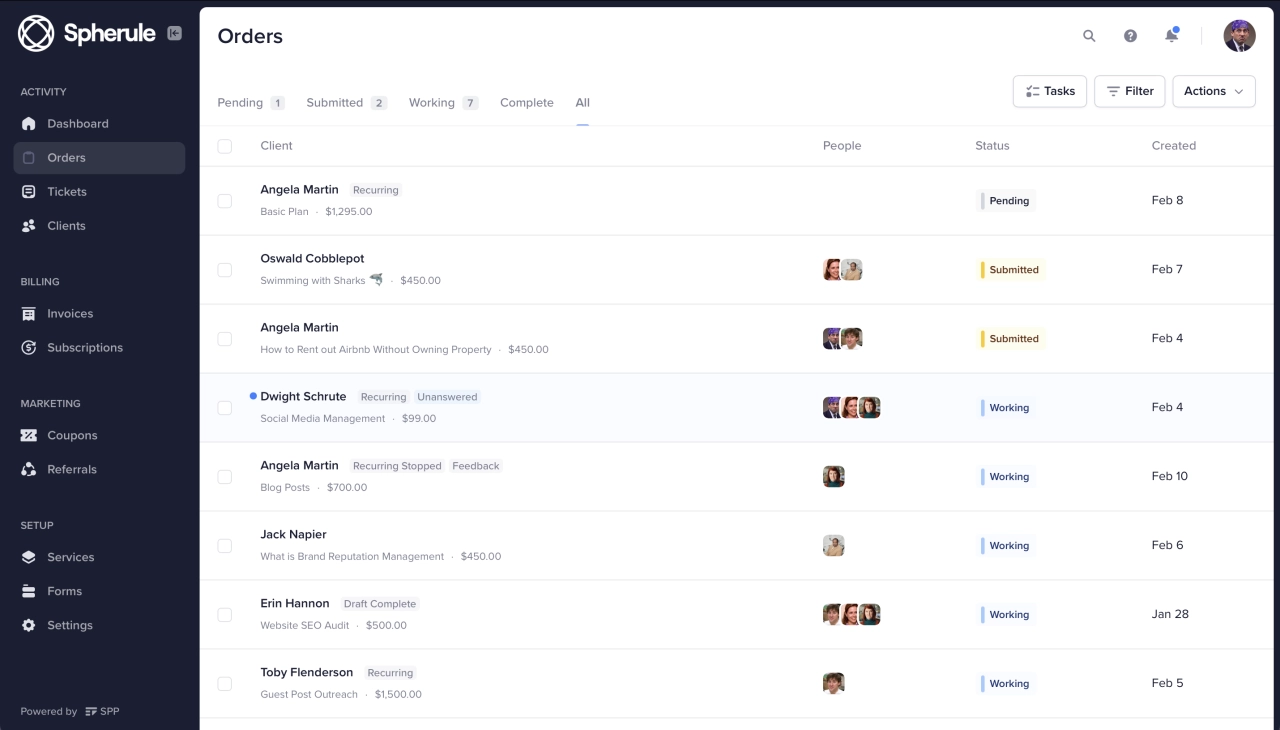
Go with Stripe. It’s the standard for a reason. Pair it with a client portal like SPP.co (that’s us—we built billing automation specifically for agencies) and billing becomes invisible. Clients subscribe, payments process, you focus on delivery.
If your clients skew smaller or less tech-savvy, add PayPal as a backup option. Some people just trust that blue button more than entering card details.
Web development agencies
You’re juggling project fees and maintenance retainers. Maybe milestone billing on bigger builds. You need something flexible enough to handle both.
Start with Stripe. It handles recurring and one-off invoices without separate systems. If your billing logic gets complicated—different rates for different clients, usage-based hosting fees, hybrid project-plus-retainer deals—look at Chargebee. But most dev agencies under 30 clients won’t need it.
Creative and design agencies
Similar to dev agencies, but your clients often skew smaller. Solopreneurs, small businesses, people who might not have corporate cards on file.
Stripe for your retainer clients, PayPal as an option for everyone else. Creative work doesn’t always fit neat monthly billing, so prioritize a system that makes one-off invoices easy alongside subscriptions.
High-volume and enterprise agencies
You’re processing $100K+ monthly across dozens of clients. At this scale, small fee differences add up, and you need proper reporting.
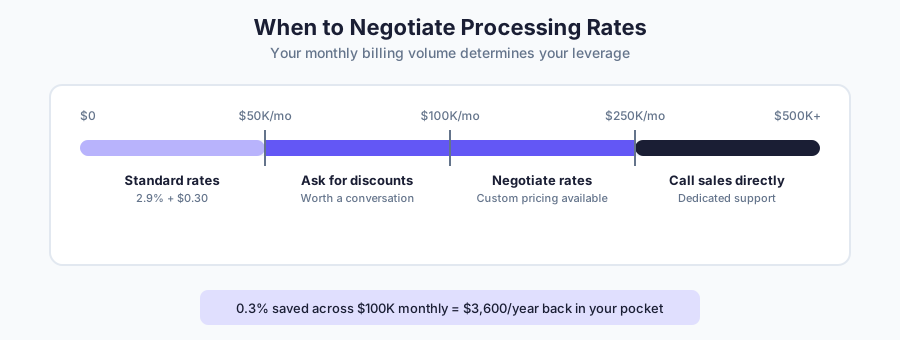
Talk to Stripe or Chargebee about custom rates. Both negotiate volume discounts. Chargebee gives you serious subscription analytics. If you have UK/EU clients, GoCardless direct debit can significantly reduce per-transaction costs.
At this scale, call sales teams directly. Custom rates are negotiable, and 0.3% saved across thousands of transactions is real money. As Lori Appleman, Co-Founder at Redline Minds, notes:
“We had one client switch from Shopify Payments to a dedicated merchant account and saved $18,000 yearly just by negotiating better rates on premium cards.”
 Lori Appleman,
Redline Minds
Lori Appleman,
Redline Minds
What actually matters when choosing
If you want to go deeper than agency type, here are the four questions that actually matter.
Does it work with your existing tools?
Your payment processor needs to connect to your client portal, CRM, and accounting software. If it doesn’t, you’re signing up for manual data entry. Native integrations beat Zapier workarounds, but Zapier beats nothing.
What does it really cost at your volume?
Transaction fees look small until you do the math. On a $3,000/month retainer at 2.9% + $0.30, you’re paying $87.30 per transaction; that’s $1,047.60 per year, per client. Across 20 clients, that’s $21,000 annually in processing fees.
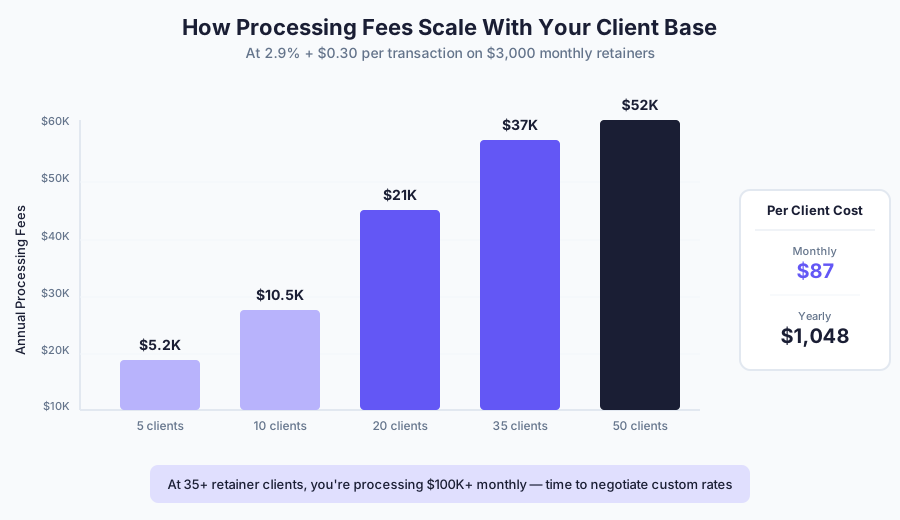
Factor this into your retainer pricing. And if you’re processing over $100K monthly, ask about custom rates—most processors negotiate.
Can clients manage their own billing?
When a card expires, can the client update it themselves? Self-service portals save hours. Look for: card updates, invoice history, receipt downloads. The less clients email you about billing, the better.
How locked in are you?
Some platforms make it easy to export data. Others make it painful enough that you just… don’t. Check: Can you export subscriber data? Are there contracts? What happens to active subscriptions if you leave?
The 7 systems
Here’s the detail on each option.
Stripe
Stripe is the default choice for a reason. Integrates with everything, handles recurring billing without fuss.
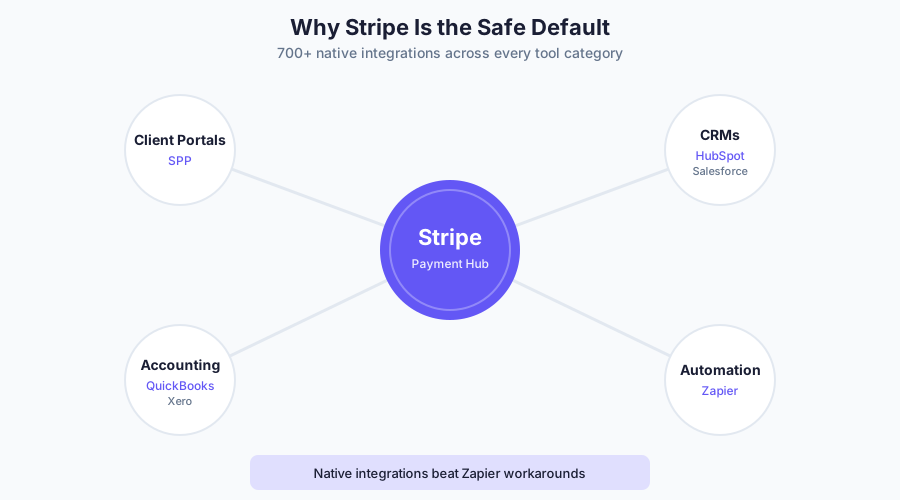
Best when: Your other tools already connect to it. Most client portals (including SPP), CRMs, and accounting software have native Stripe integrations.
Watch out for: The dashboard assumes some technical comfort. Words like “API” and “webhook” appear. Not hard, but there’s a learning curve.
Real cost: 2.9% + $0.30 per transaction. Custom rates negotiable if you’re processing over $100K monthly.
Client experience: Customer Portal lets clients update payment methods, view invoices, download receipts.
Integrations: 700+ native integrations including SPP.co, HubSpot, QuickBooks, Xero, Zapier.
PayPal
Your clients already have accounts. They trust it. That familiarity removes friction.

Best when: Clients prefer PayPal, or you’re working internationally. Available in 200+ countries with automatic currency conversion.
Watch out for: Reputation for freezing accounts on “suspicious activity” (sometimes just a payment spike). Weaker seller protection than Stripe. Limited customization. Lori Appleman, Co-Founder at Redline Minds, warns: “These platforms can freeze your funds during their risk assessments, and I’ve seen businesses lose weeks of cash flow because they let too much money accumulate in their payment accounts.”
Real cost: 2.99% + $0.49 for standard card payments depending on checkout type. PayPal/Venmo payments are 3.49% + $0.49. International and currency conversion add extra fees.
Client experience: Guest checkout available but interface pushes PayPal signup. Self-service billing management limited compared to Stripe.
Integrations: Broad but basic. Works with SPP, most invoicing tools, major ecommerce platforms. Zapier fills gaps.
Square
Square is known for retail, but their invoicing and online payments work for service businesses too. Simple setup, predictable pricing, and a surprisingly good mobile experience.
Best when: You want simple invoicing without complexity, you occasionally meet clients in person (and want one system for both), or you’re already using Square for something else.
Watch out for: Online rates (2.9% + $0.30) match Stripe, but the real value is in-person payments if you need them. Less sophisticated subscription management than Stripe. Fewer integrations with agency-specific tools.
Real cost: 2.9% + $0.30 for online/invoice payments. 2.6% + $0.15 for in-person. ACH is 1% ($1 min). No monthly fee on the free plan.
Client experience: Clean invoices, easy payment. Clients can save cards for future payments. No full self-service portal like Stripe’s.
Integrations: Works with QuickBooks, Xero, and common business tools. Fewer agency-specific integrations than Stripe.
GoCardless
GoCardless is popular if you want direct debit for recurring payments—money pulls directly from bank accounts instead of charging cards. Popular in UK and Europe where direct debit is common. Lower fees than card processing.
Best when: You have UK or EU clients comfortable with direct debit. Particularly good for higher-value retainers where card fees add up. Works in 30+ countries.
Watch out for: U.S. clients aren’t used to direct debit—it’ll feel unfamiliar. Payments take 3-5 days to clear (not instant like cards). Failed payment recovery is different than card retry logic.
Real cost: 1% + £0.20 per transaction (domestic UK), capped at £4 per transaction. International is 2% + £0.20. Significantly cheaper than cards on larger transactions.
Client experience: Clients authorize a mandate once, then payments pull automatically. Less friction for ongoing billing, but the initial setup feels different than entering a card.
Integrations: 350+ integrations including Xero, QuickBooks, and major subscription platforms. Works alongside Stripe if you want to offer both options.
HubSpot Payments
If you’re already on HubSpot, their payments keep everything in one place. Quotes, invoices, subscriptions, payment data—all in the same CRM.
Best when: You’re deep in HubSpot and want to simplify your stack. Payment status shows in contact records, workflows trigger on payment events.
Watch out for: You’re locked to HubSpot. Switch CRMs and you’re rebuilding payments too. Feature set is thinner than dedicated platforms. U.S. only currently.
Real cost: 0.5% platform fee on top of Stripe’s standard 2.9% + $0.30. A $3,000 retainer costs $102.30 total (vs Stripe’s $87.30 alone). The fee is 0.75% if using their native processor instead of Stripe.
Client experience: Clean portal for quotes, invoices, subscriptions. Tied to your HubSpot configuration.
Integrations: Native to HubSpot. Works with Stripe as underlying processor.
Chargebee
Built for subscription complexity. Tiered pricing, usage-based billing, add-ons, trials, enterprise contracts—Chargebee handles it without spreadsheets. Sits on top of your payment gateway and manages the subscription logic.
Best when: Your billing is too complicated for simple recurring charges. Multiple pricing tiers, metered usage, proration, pause/resume. Also good if you need revenue analytics (churn, MRR, cohort analysis) built in.
Watch out for: Monthly fees add up as you scale. Hard to migrate away once embedded—your subscription data and dunning become dependent on their system.
Real cost: Doesn’t process payments directly—you connect your own gateway. Free up to $250K billing, then $249/month (up to $600K) or $549/month (up to $900K).
Client experience: Full-featured portal. Clients manage subscriptions, update payments, view invoices. Self-service is a strength.
Integrations: 100+ native integrations including Stripe, PayPal, Salesforce, HubSpot, accounting tools.
Authorize.net
Authorize.net is one of the oldest payment gateways, now owned by Visa. You’ll see it recommended by banks, accountants, and older business guides. Some agencies still use it from legacy setups.
Best when: Your bank or accountant specifically recommended it, you have an existing merchant account relationship, or you’re already using it and migration isn’t worth the hassle. Some industries with specific compliance requirements still default to it.
Watch out for: The $25/month gateway fee when competitors charge nothing. The dashboard feels dated—users report struggling to find transactions and run reports. After Visa’s recent UI changes, subscription management has gotten worse, with the system creating duplicate customer profiles. For most agencies starting fresh, there’s no compelling reason to choose it over Stripe.
Real cost: $25/month + 2.9% + $0.30 per transaction. Same processing rate as Stripe, but the monthly fee adds up. On a $3,000 retainer, you’re paying $87.30 in processing plus the $25 gateway fee—$112.30/month total vs Stripe’s $87.30.
Client experience: Basic. No modern self-service portal comparable to Stripe’s Customer Portal.
Integrations: Works with major platforms, but integration quality varies. Account Updater feature keeps cards current, which helps with failed payments. Less plug-and-play than Stripe’s 700+ native integrations.
Before you commit: migration considerations
Switching payment systems mid-stream is painful. Not impossible, but painful enough that you should think about it before you need to.
Here’s what actually happens when you migrate: Your subscriber data exports fine (usually). Your active subscriptions don’t. Most platforms let you download a CSV of customers and their payment history, but they can’t transfer live recurring billing to another system. You’ll need to re-collect payment information from every client.
That means emailing clients, asking them to re-enter card details, and dealing with the ones who don’t respond promptly. Some agencies lose clients in the shuffle—not because they’re unhappy, but because the friction of re-entering payment info is enough to make them “forget” to continue.
What affects how long this takes
There’s no universal timeline because every agency’s situation is different. But here’s what moves the needle:
Number of active subscribers. 10 clients is a weekend project. 100+ clients means weeks of coordination and follow-up.
Billing complexity. Simple monthly retainers migrate faster than tiered pricing with add-ons, usage tracking, or custom billing dates.
Re-collecting payment info. If you can’t transfer card tokens (common), you’re emailing every client asking them to re-enter details. Response rates vary wildly.
Your current provider. Some export data in days. Others drag their feet, especially if you’re leaving. Check your contract for data access terms.
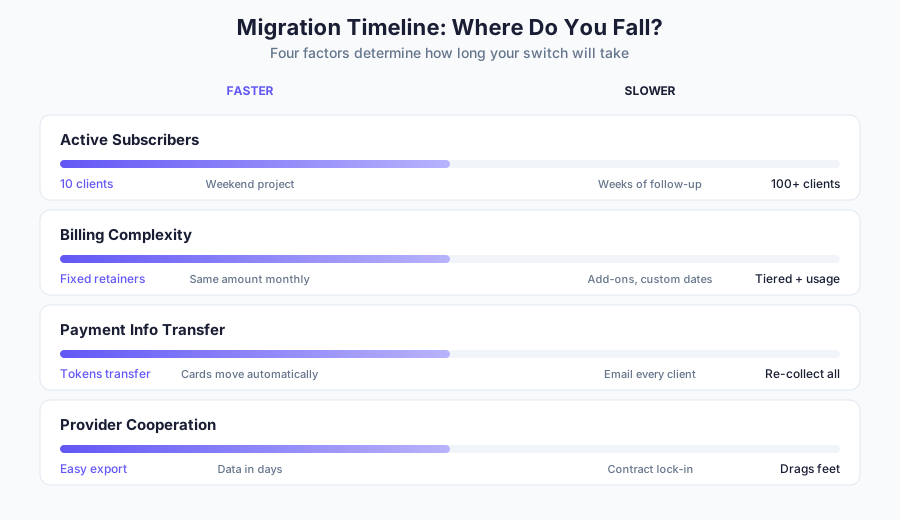
For a typical agency with 20–50 retainer clients on straightforward monthly billing, expect 2–4 weeks from decision to fully switched. More complexity, more clients, or an uncooperative provider = more time.
Dwight Zahringer, Founder at Perfect Afternoon, recommends running systems in parallel:
We process real transactions through both the old and new systems for at least two weeks, comparing success rates, decline patterns, and customer feedback. This caught a critical issue where international cards were failing 40% more often on the new system—something we never would have found in sandbox testing.”
 Dwight Zahringer,
Perfect Afternoon
Dwight Zahringer,
Perfect Afternoon
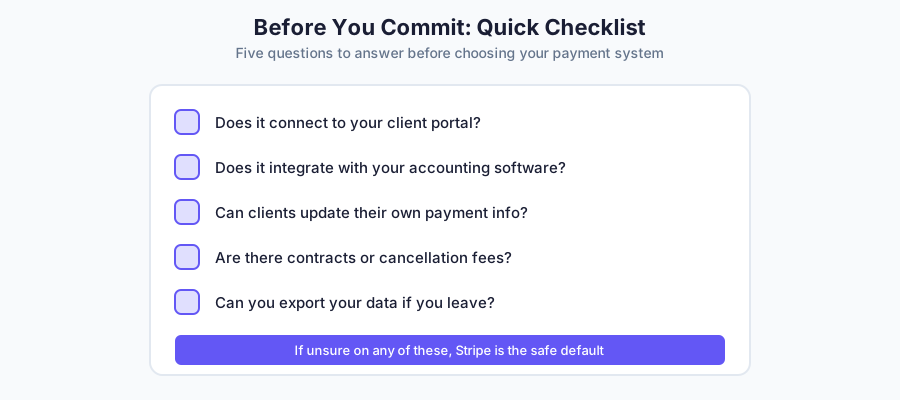
Questions to ask before you commit
What can I export? Customer records, transaction history, subscription details? Get specific. “We support data export” can mean anything.
Are there contracts or cancellation fees? Month-to-month is ideal. Watch for annual contracts with auto-renewal clauses.
What happens to my data if I leave? Some platforms delete your data after a grace period. Others make it available indefinitely. Know the policy.
Can I transfer card tokens? Some processor-to-processor migrations preserve payment methods. Most don’t. Ask upfront.
What about changing Stripe accounts?
Even if you’re staying with Stripe, changing accounts is more painful than you’d expect. This comes up when ownership changes (selling your agency), when your company moves countries (EU company becomes a US LLC), or when restructuring entities.
You’re not switching processors, but you still can’t just move subscriptions between Stripe accounts.
Here’s what the process actually looks like:
Ask Stripe to copy customer data from your old account to your new account.
Create new subscriptions on the new Stripe account for each client, with trial periods set to their next billing date (so they don’t get charged twice).
Map old subscription IDs to new ones in a CSV.
Send the mapping to your client portal provider so they can update the subscription references.
Disconnect the old Stripe account and connect the new one.
It’s doable, but it’s not a quick afternoon project. Plan for it if you’re considering any business structure changes.
The best time to think about this is now, while you’re choosing. Pick a system you could see yourself using for three to five years. And if you’re not sure? Stripe’s portability is one reason it’s the safe default—your data stays accessible, there are no contracts, and most other systems can import from it.
Frequently asked questions
What’s the best way to set up recurring payments?
Connect a payment processor like Stripe to your client portal or invoicing tool, then create subscription plans matching your service tiers. The goal is fully automated billing where payments process monthly without manual intervention.
Why do recurring payments fail?
Three main reasons: expired cards, insufficient funds, or bank fraud flags. Most failures are recoverable through automatic retry logic and dunning emails. For persistent issues, see our guide on handling clients who aren’t paying.
Can I switch payment systems without losing subscribers?
You can migrate subscriber data, but active billing doesn’t transfer automatically. Clients will need to re-enter payment information on your new system. Budget 2–4 weeks for a typical agency migration.
Do I need to worry about PCI compliance?
No. Stripe, PayPal, and other major processors handle PCI compliance for you. Card data never touches your servers. Just never store card numbers yourself—no emails, no spreadsheets.
Which recurring payment system is cheapest?
Stripe charges 2.9% + $0.30 per transaction. PayPal charges 2.99% + $0.49 for cards, or 3.49% + $0.49 for PayPal/Venmo payments. GoCardless is cheapest for UK/EU at 1% + £0.20.
What if my clients are international?
Most processors support international payments, but expect 1–2% extra for currency conversion. GoCardless is particularly strong for UK/EU clients with lower direct debit fees. Compare total costs (processing plus FX fees) if you regularly bill clients in other currencies.
Pick one and move on
You don’t need the perfect payment system. You need one that works with your tools, doesn’t surprise you with fees, and lets clients pay without emailing you.
For most agencies, that’s Stripe. It’s the safe default because it integrates with everything, scales without drama, and you can always add complexity later if you need it.
Use PayPal if your clients already prefer it. Use Square if you want simple invoicing with optional in-person payments. Use GoCardless if you have UK/EU clients and want lower fees through direct debit. Use HubSpot Payments if you’re committed to their ecosystem. Use Chargebee if your billing logic has outgrown simple recurring charges. Stick with Authorize.net if you’re already on it and migration isn’t worth the hassle—but don’t choose it for a fresh start.
The decision matters less than the execution. Pick one, connect it to your client portal, set up your subscription tiers, and stop thinking about payments. The best billing system is the one you forget is running.
If you’re looking for a client portal that handles the Stripe integration for you—subscriptions, invoices, client self-service, the works.